Introduction
An always-on, event-driven agent that lives on your machine.
sedge is an agent that keeps working after you close the terminal. You talk to it in a TUI on your computer, or from your phone on Telegram or Slack. It's event-driven: it wakes when something happens (a message, a timer, your CI failing), does the work, tells you what matters, and goes back to sleep.
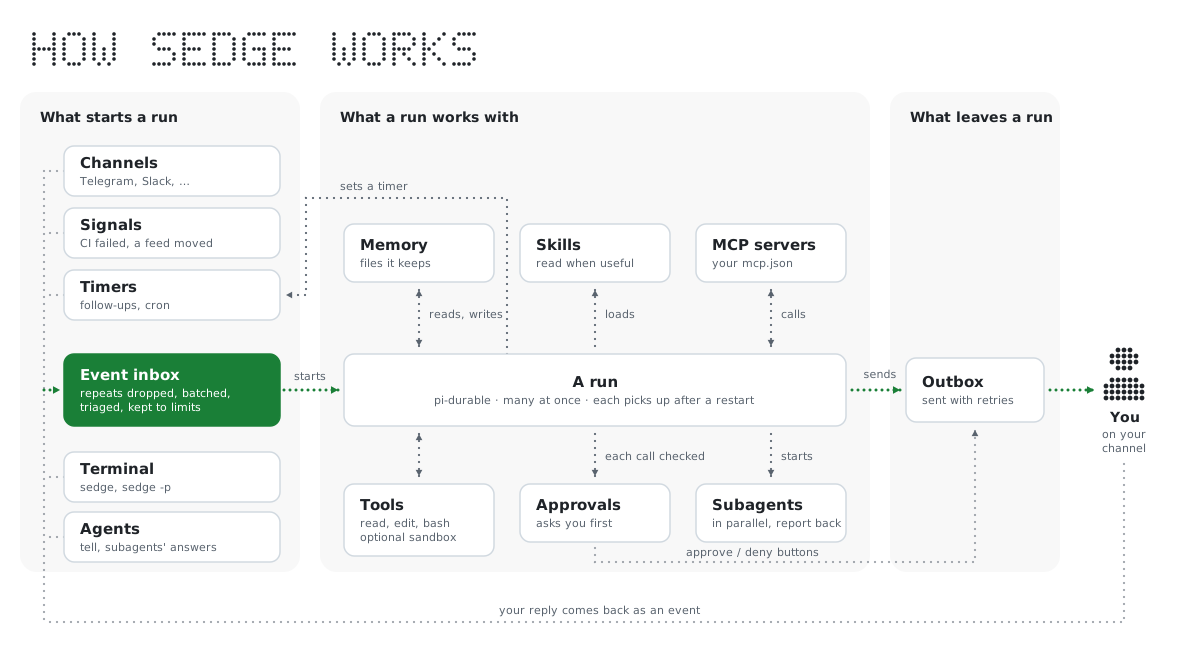
It has two halves:
- The TUI (
sedge): a coding agent in your terminal, built on pi. Everything pi does works here, plus tools to set sedge up. - The daemon (
sedge start): runs in the background. It holds an inbox of events, fires timers, keeps memory, asks before risky actions, and sends you messages. Its conversations are durable: a run cut short by a restart picks up where it stopped.
Why use it
A coding agent in a terminal stops when you stop. Most of what needs you happens while you're doing something else: CI goes red after you've left, someone asks for your review, the release you were waiting on comes out. sedge is the coding agent that's still there.
- It notices things for you. Tell it to watch CI on
main, your GitHub reviews and mentions, a page or a feed, a webhook, a folder, a log or an MQTT sensor. When something happens it wakes and can dig in before it writes, so the message you get can say what broke, not just that something did. - It stays quiet otherwise. Conditions ("above 30 °C"), throttles ("at most once an hour") and an optional cheap triage model keep routine events from waking it, so you hear about what matters and pay for runs that need doing.
- You can hand it work and walk away. Ask from your phone to fix the failing test, or say "check on the deploy at 6". It works in your repositories with your tools, and asks before running a command or an MCP tool you haven't allowed.
- It remembers. What you told it last week, how your projects are laid out, what you prefer. It keeps its own notes and tidies them every night.
- It doesn't drop work. A run cut short by a crash, an update or a restart picks up where it stopped, and an event that arrives twice is answered once.
- It splits the work. Give it agents with jobs of their own (one for CI, one for a Slack workspace), each with its own conversation and memory, passing work between them. For a job with many parts, an agent starts subagents that work in parallel and report back.
- It stays within bounds. Optional limits cap runs per hour, tokens and money per day, and subagents at once. An optional OS sandbox keeps its commands to the folders you allow and away from your credentials. See Limits and costs and Sandbox.
- It's yours. It runs on your machine, with your model logins, MCP servers and skills. There is no sedge server, and it sends no telemetry.
Use cases has more, from watering plants to catching a spike in errors.
Use it
Getting started · Use cases · Channels and signals · Agents · Memory · Extensions, MCP and skills
Understand it
How it works · Logs and runs · Limits and costs · Security · Sandbox